 how-to
7 Steps to Integrate AI Security with Your Existing Infrastructure
Last Updated: October 25, 2026
Quick Summary
Integrating ai security with existing infrastructure starts with a full inventory of cameras, access control panels, alarm systems, and network paths before buying any new component. You then confirm compatibility, add analytics, connect events to your VMS, access control, and SIEM, and plan rollback before go-live.
- Document model numbers, supported protocols, and firmware for every camera and controller.
- Cameras supporting RTSP and ONVIF are easiest to bring into an AI analytics layer.
- The event-bus pattern is recommended for most multi-vendor security stacks.
- Never give the AI platform administrative credentials to the VMS or access control.
- Pilot on a small camera group first so problems surface with a small blast radius.
Table of Contents
- Step 1: Assess Your Existing Infrastructure and Compatibility
- Step 2: Understand AI Surveillance System Compatibility
- Step 3: Add AI Video Analytics for Existing Cameras
- Step 4: Connect AI to Your Security Stack and Security Operations
- Step 5: Address AI Security Integration Challenges Before Rollout
- Step 6: Apply AI Security Implementation Best Practices
- Step 7: Plan for Rollback, Resilience, and Vendor Due Diligence
- Book Your Integration Assessment with Mt. Major Tech
- Frequently Asked Questions
Step 1: Assess Your Existing Infrastructure and Compatibility
Integrating AI security with existing infrastructure starts with a full inventory, not a purchase order. At Mt.
The assessment covers four areas: device age and firmware, network capacity and segmentation, recording and storage, and management software. Document model numbers, supported protocols, and current firmware for every camera and controller. Skipping the firmware audit is a common mistake, you discover mid-project that half the fleet cannot pass a video stream to an analytics engine.
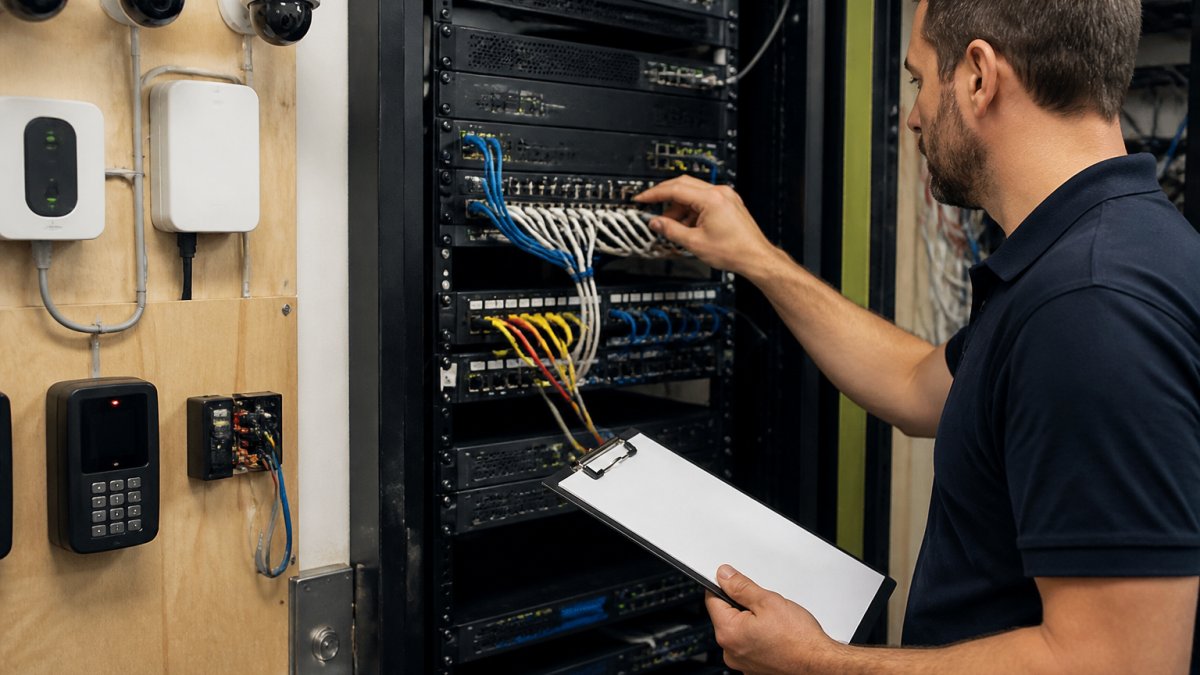
Decision gate: if more than roughly a third of your devices lack support for standard streaming and management protocols, plan a staged hardware refresh rather than forcing analytics onto equipment that cannot carry it.
Step 2: Understand AI Surveillance System Compatibility
AI surveillance system compatibility comes down to three questions: can the camera stream video in a standard format, can the network carry it reliably, and can the analytics platform authenticate to the device. Cameras supporting RTSP and ONVIF are easiest to bring into an AI layer, since those open standards let an analytics engine pull video without vendor-specific software.
Proprietary or older analog equipment is where projects stall: some manufacturers lock analytics behind their own recorders, and some legacy cameras cannot output a usable stream. Do the compatibility review before you sign anything, ask the analytics vendor for a written list of supported camera models and protocols, then match it against your inventory.
- Open standards support: RTSP streaming and ONVIF profiles for device discovery and control
- Network readiness: sufficient bandwidth and a segmented VLAN for camera traffic
- Edge versus server processing: whether analytics runs on the camera, an appliance, or the cloud
Step 3: Add AI Video Analytics for Existing Cameras
AI video analytics for existing cameras inserts an analytics layer between the camera stream and your recording system. That layer classifies objects and behavior, people, vehicles, loitering, perimeter crossing, and sends only meaningful events to your monitoring interface.
You have two deployment patterns. Edge analytics runs on compatible cameras or a local appliance, keeping bandwidth low and working if the internet drops. Server or cloud analytics centralizes processing and is easier to update across a large campus, but depends on solid network links.
For a deeper walkthrough of connecting analytics to recorders and management platforms, see our guide on integrating AI video analytics with existing security systems.
Step 4: Connect AI to Your Security Stack and Security Operations
Connecting AI to your security stack means feeding its events into the systems your team already watches: the video management system (VMS), access control, the alarm platform, and where you have one, the SIEM.
Most guides stop at "use APIs and webhooks", that is not an integration plan. Success depends on the reference architecture you choose and the trust boundaries you draw around it.
Three integration patterns
1. Event-bus pattern (recommended for most multi-vendor stacks). The AI analytics layer publishes normalized events to a message broker or event bus, and each downstream system subscribes to the event types it cares about.
2. Direct API pattern (simplest, least resilient). The analytics platform calls each target system's REST API or fires webhooks on every event.
3. SIEM-centric pattern (best when security operations already run through a SIEM). The AI layer forwards events and metadata to the SIEM, and correlation rules there drive the response workflow.
Data flows and trust boundaries
Whichever pattern you choose, document four flows and the boundary each crosses:
- Camera to analytics: video streams (RTSP) or snapshots cross from the camera VLAN into the analytics segment. Treat analytics as a distinct trust zone; never place analytics hosts on the camera VLAN.
- Analytics to event bus or SIEM: normalized events and metadata cross into the security operations zone. Authenticate every publisher and subscriber, and encrypt in transit.
- Analytics to VMS and access control: control-plane calls (PTZ, door state queries, bookmark creation) cross into operational technology. Restrict these to a least-privilege service account and log every call.
Do not let the AI platform hold administrative credentials to the VMS or access control system. Use a dedicated integration account scoped to only the endpoints the workflow needs, and rotate its credentials on a schedule.
What to confirm before committing
- Authentication: does each platform support OAuth 2.0, API keys, or mutual TLS, and can you scope permissions per integration?
- Event schema: is there a documented, versioned event format, or will you be mapping fields by hand?
- Rate limits and backpressure: what happens when event volume spikes, are events queued, dropped, or throttled?
- Idempotency: can the same event be delivered twice without creating duplicate alarms?
An insider point most guides miss: the value is not the AI model itself but the routing and correlation logic. A well-configured rule that suppresses duplicate alerts and escalates genuine ones changes analyst workload far more than a marginally better detector. Build that logic in the SIEM or event bus, not inside the analytics vendor's proprietary console, so you keep it if you change vendors.
Once AI is wired into the stack, the integrated network becomes a target in its own right.
Step 5: Address AI Security Integration Challenges Before Rollout
The biggest AI security integration challenges are planning gaps, not technical failures: unclear ownership, poor data quality, and unrealistic expectations about false positives.
Watch out: skipping a pilot and rolling analytics across every camera at once is the most common way these projects derail. Our AI Security Camera Installation Checklist for Businesses helps catch compatibility and rollout issues before deployment.
Other challenges to plan for:
- Data quality and governance: clean device inventories, consistent naming, and clear retention rules
- Privacy and compliance: documented policies for footage access, especially in healthcare and legal settings
- Change management: training analysts on new workflows, not just new software
- Human oversight: defined rules for when a person reviews an AI-flagged event
Step 6: Apply AI Security Implementation Best Practices
AI security implementation best practices center on measurable outcomes and disciplined tuning. Define success criteria before go-live: detection accuracy on your own scenes, false positive rate per camera per day, mean time to detect, and mean time to respond.
Tune in stages: start with high-value zones such as entrances and perimeter lines, validate for a few weeks, then expand. Keep a feedback loop where analysts mark alerts valid or invalid, and review that data monthly.
| Practice | What It Looks Like | Why It Matters |
|---|---|---|
| Baseline metrics | Record current false alarm and response times | Proves improvement later |
| Phased tuning | High-value zones first, then expand | Limits disruption |
| Analyst feedback loop | Mark alerts valid or invalid weekly | Improves accuracy over time |
| Documented ownership | Named owner for each system | Prevents gaps after handoff |
Step 7: Plan for Rollback, Resilience, and Vendor Due Diligence
Resilience planning decides whether an AI layer becomes a dependable part of your security operations or a single point of failure. Most integration guides treat this as a footnote, yet it is where projects quietly fail months after go-live, when a model drifts, a vendor changes an API, or a cloud region goes down. Here are the failure modes to plan for, the fallback mechanics to build, and the vendor questions to ask before you connect anything.
Failure modes to design for
- Analytics service outage: the AI platform or its cloud dependency is unreachable. Recording must continue independently.
- Model drift: detection accuracy degrades as scenes, lighting, or camera angles change. You need a way to detect this before analysts lose trust.
- Incorrect recommendations: the AI flags benign activity or misses a genuine event. The workflow must let a human override without disabling the system.
- Compromised AI component: an attacker gains control of the analytics host or its integration credentials. Segmentation and least privilege limit the blast radius.
Rollback mechanics and triggers
Define rollback before go-live, not during an incident. A workable plan has three parts:
- A documented fallback state. The system reverts to camera recording plus existing alarm workflows, with the AI layer disabled but not uninstalled. Confirm in writing that recording and access control continue to function with the AI layer off.
- Explicit triggers. Common ones include a sustained false-positive rate above an agreed threshold for a set period, integration error rates above a defined level, or a failed validation checkpoint after a model update. Set the numbers with your team during the pilot; do not leave them vague.
- A tested procedure. Run a rollback drill during the pilot. The drill should confirm who has authority to trigger rollback, how long it takes, and how analysts are notified.
Keep local recording as the safety net. If cloud analytics or storage becomes unavailable, cameras should still record and your team should still have access to footage through the local system. Test this by disabling the AI layer for a day during the pilot and confirming operations continue.
Vendor due diligence checklist
Before connecting a system, get written answers to these questions:
- Model provenance and updates: where do the models come from, how often are they updated, and can you pin a version or delay an update until you have validated it?
- Data handling: what video or metadata leaves your premises, where is it stored, for how long, and is it used to train models?
- Access controls: what credentials does the platform need, can they be scoped, and is there an audit log of every action the platform takes?
- Logging and incident response: what does the vendor log, how quickly do they notify you of a security incident, and what is their remediation commitment?
Book Your Integration Assessment with Mt. Major Tech
The hardest part of integrating AI security with existing infrastructure is not the technology. It is knowing what your current systems can actually support, and sequencing the work so nothing goes dark along the way.
Get started with Mt. Major Tech and turn your existing cameras and controls into one coordinated defense. Contact Us to book your integration assessment. Book Online to book your integration assessment.
Frequently Asked Questions
Can AI security work with existing security cameras and access control systems?
In most cases, yes. AI video analytics can run on cameras that support RTSP streaming, and many access control platforms expose APIs for integration. The key is compatibility: check whether your cameras, network video recorders, and access panels support open protocols. Older analog or proprietary systems may need encoders or middleware. A site assessment confirms what stays, what gets upgraded, and what can be bridged without replacing everything.
What are the biggest AI security integration challenges?
The most common challenges include poor data quality from legacy cameras, limited interoperability between vendors, network bandwidth constraints, and unclear ownership of AI alerts. Privacy and compliance requirements add another layer, especially in healthcare and regulated facilities. Planning for these early, with a phased rollout and clear success criteria like reduced false positives and faster mean time to detect, keeps the project on track.
How should you test an AI security system before a full rollout?
Start with a pilot on a small zone or building. Define measurable success criteria such as detection accuracy, false positive rate, and analyst workload before you begin. Run the AI alongside your existing rules for several weeks, compare alerts, and set decision gates for expanding. Test failover too: confirm what happens if the cloud service goes down and that local recording keeps working.
How do you protect privacy when deploying AI-powered surveillance?
Limit collection to what the security use case requires, restrict access by role, and document retention periods. Use privacy masking for areas where people expect seclusion, and keep audit logs of who views footage. In regulated environments like healthcare, align the deployment with HIPAA requirements for protecting identifiable information. A written data governance policy and vendor due diligence on how footage is stored and processed are essential.