 ultimate-guide
Smart Door Locks: Key Benefits for Homeowners
Table of Contents
- Why Smart Door Locks Are Worth It for Homeowners
- Convenience and Keyless Entry: Say Goodbye to Hidden Keys
- Enhanced Home Security Features That Deter Intruders
- Remote Access and Smartphone Control for Peace of Mind
- Temporary Access for Guests and Service Providers
- Smart Home Security Integration: Connecting Locks to Your Ecosystem
- Activity Monitoring and Access Logs: Know Who Comes and Goes
- Auto-Lock and Proximity Features: Never Forget to Lock Up Again
- The Drawbacks: Pros and Cons of Keyless Entry
- Installation, Maintenance, and What Most Guides Skip
- Frequently Asked Questions
Last Updated: September 13, 2026
Why Smart Door Locks Are Worth It for Homeowners
A mechanical lock tells you nothing, not who arrived, when they left, or whether the door is secured right now. A smart lock can. At Mt. Major Tech, we install and support smart access control across Northern New England, and homeowners rarely buy a smart lock for the gadget factor. They buy it because they are tired of guessing.
Smart door locks are electronically controlled deadbolts that replace a standard mechanical deadbolt and can be locked, unlocked, monitored, and audited through a mobile application. That single change touches convenience, security, guest access, and record-keeping at once.
Below, we break down each benefit, then cover the drawbacks, installation, and maintenance issues most guides skip.
Convenience and Keyless Entry: Say Goodbye to Hidden Keys
Keyless entry is the benefit homeowners notice first, because it removes the weakest habit in home security: the hidden key. Under the mat, in the fake rock, taped inside the meter box, every one of those spots is known to anyone who has ever looked for a spare key.
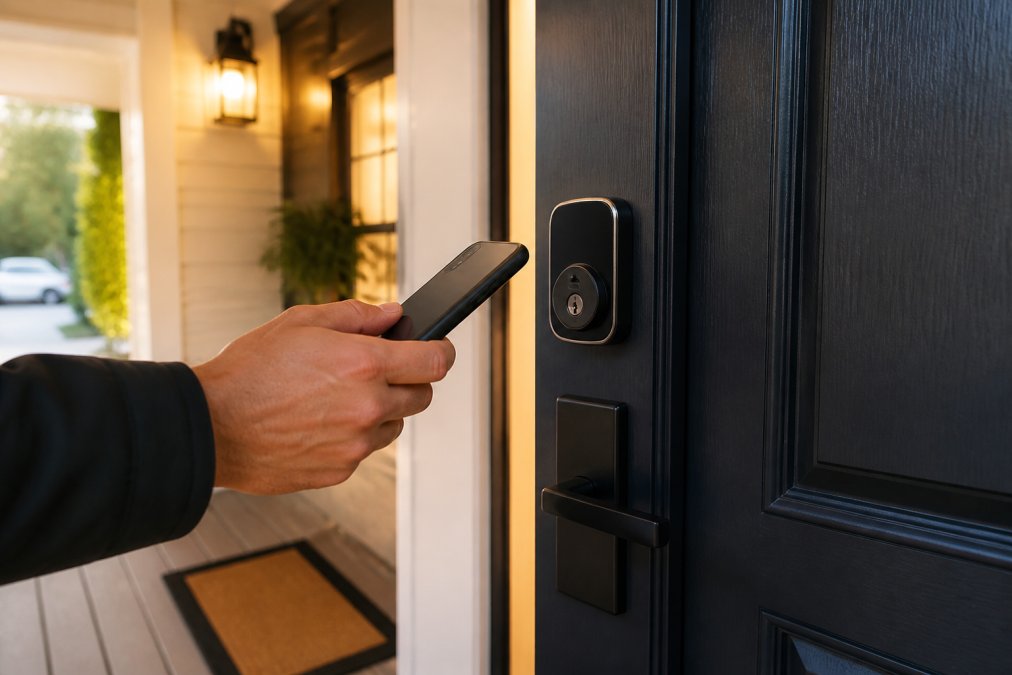
A smart lock replaces that with a fingerprint scanner, a keypad code, or your phone. You stop carrying a house key. You stop leaving one outside. According to CISA guidance on physical security, physical access points remain one of the most commonly exploited weaknesses in any security setup, and an exposed spare key is exactly that.
The practical wins are small but constant:
- No more lockouts after a morning run
- No more rekeying the whole house because a contractor kept a copy
- No more fumbling for keys with an armful of groceries
Enhanced Home Security Features That Deter Intruders
A smart lock's deterrent value comes from what it makes visible and what it records. Tamper alerts fire when someone forces the keypad or pries the housing, and real-time notifications tell you the moment the door opens. An intruder who knows the door logs every attempt behaves differently than one facing a silent mechanical cylinder.
But most guides stop at the deadbolt and skip the part that actually decides whether your lock protects you or exposes you: the wireless layer.
The Physical Layer: What a Deadbolt Still Does
A smart lock is still a deadbolt. It does not stop a determined intruder with tools and time, but it raises the effort required and removes the easy paths, the hidden key, the unlatched door, the code shared with a contractor three years ago. That is the realistic goal of any single layer of defense, and it is why the lock should sit inside a broader system rather than stand alone.
The Digital Layer: Where Smart Locks Actually Get Compromised
Every smart lock is a small computer with a radio. That radio is the attack surface, which is why cybersecurity deserves the same attention as the bolt itself.
- Encryption in transit. Look for modern encryption between the lock, your phone, and the cloud. Older or proprietary protocols that transmit codes in the clear are the ones researchers demonstrate bypassing at security conferences.
- Firmware updates. A lock that cannot receive over-the-air security patches stays vulnerable for its entire service life. Confirm the manufacturer ships updates and that you can enable automatic installation.
- Account security. Your lock is only as strong as the app account behind it. Enable multi-factor authentication, use a unique password, and review which devices are authorized to unlock.
- Data privacy. Access logs, entry timestamps, and unlock history are personal data. Read the manufacturer's privacy policy before you buy: where logs are stored, how long they are retained, whether they are shared with third parties, and whether you can export or delete them. A lock that stores everything in the cloud with no deletion option is a privacy trade-off, not a feature.
Two-Factor Authentication, Explained Plainly
A lock that opens with a code alone can be compromised by a shared or guessed code; one that requires a code plus a confirmed device is a different problem entirely. This is the highest-leverage setting on most locks, and it is usually buried in the app menu rather than surfaced during setup.
What Deterrence Actually Looks Like
The visible parts matter too. A keypad with an illuminated tamper alert, a camera integrated with the lock, and a porch light that triggers on unlock all signal that the home is monitored. Deterrence is not one feature; it is the impression that entry will be recorded, attributed, and reported. That impression is what changes behavior.
Remote Access and Smartphone Control for Peace of Mind
Remote access answers the question that keeps people up at night: did I lock the door? From a mobile application, you can check lock status, lock or unlock the door, and review recent activity from anywhere.
That capability depends on a Wi-Fi bridge or smart home hub connecting the lock to your network. Bluetooth alone only works within range, so a purely Bluetooth lock will not help you from an airport. Check which radios the lock uses before you buy.
The peace-of-mind benefit is real, but conditional. If your home internet drops, remote access drops with it. Local control through the keypad or a mechanical key override still works, which is why every serious lock keeps a physical fallback.
Temporary Access for Guests and Service Providers
Temporary passcodes solve a problem mechanical locks handle badly. A housekeeper, dog walker, contractor, or visiting relative needs in, and you do not want to hand over a permanent key or a code you use yourself.
With user permissions, you issue a code that works for a set window: Tuesday 9 a.m. to 11 a.m., or the three days a contractor is on site. When the window closes, the code stops working. No key to collect, no code to remember to change.
For property management and second homes, this is often the deciding feature: grant access to a cleaner without ever being on site, then review the activity log to confirm the visit happened.
Smart Home Security Integration: Connecting Locks to Your Ecosystem
Integration is where smart home security integration stops being a buzzword and starts being useful. A lock that talks to the rest of your system can trigger a camera when the door opens, disarm an alarm on a valid entry, or turn on lights at night.
The catch is ecosystem compatibility. Locks, hubs, cameras, and voice assistants do not all speak the same language. Before buying, confirm three things:
- Which smart home ecosystem the lock supports
- Whether it needs a separate hub or bridge
- Whether voice assistant integration covers locking, unlocking, or only status checks
Most platforms restrict voice unlocking for good reason. A voice command that opens your front door is a security liability if it can be triggered from outside a window.
Activity Monitoring and Access Logs: Know Who Comes and Goes
Access logs turn your front door into a record. Every code entry, app unlock, and key turn is timestamped and attributed to a user. Over a month, that log tells you more about your home's traffic than any camera angle.
For families, it settles arguments about who left the door unlocked. For anyone managing a property, it provides documentation. If a package goes missing or a room was entered without permission, the log narrows the window and the person.
The limitation is retention. Some locks store limited history locally; others push logs to the cloud where they last longer. If record-keeping matters, check how long the log is kept and whether you can export it.
Auto-Lock and Proximity Features: Never Forget to Lock Up Again
Auto-lock quietly prevents the most common failure: the unlocked door. You set a timer, and the deadbolt engages itself after a set period. Proximity sensing goes further, locking when your phone leaves the area and unlocking as you approach.
This is the benefit that pays off on the days you are distracted. A door that locks itself at 10 p.m. every night removes the variable entirely.
The Drawbacks: Pros and Cons of Keyless Entry
The pros and cons of keyless entry deserve an honest look, because a smart lock introduces failure modes a mechanical lock does not have.
| Factor | Smart Lock | Mechanical Lock |
|---|---|---|
| Convenience | High, with app and code access | Low, key required |
| Remote monitoring | Yes, with network connection | None |
| Power dependency | Batteries, needs backup plan | None |
| Cybersecurity exposure | Requires strong encryption and updates | Not applicable |
| Failure mode | Battery drain, network loss | Key loss, lockout |
The realistic cons:
- Battery life. A lock dies without warning if you ignore the low battery indicator. Keep the mechanical key override accessible, and know where it is.
- Network dependence. Cloud features need a working connection. Local access still functions.
- Cybersecurity. A poorly secured lock is a network device. Weak encryption protocols or unpatched firmware are genuine risks.
- Compatibility. An older door or an unusual deadbolt replacement situation may need professional assessment.
Installation, Maintenance, and What Most Guides Skip
Installation is where a good lock becomes a bad experience. Deadbolt replacement is not always a straight swap. Door thickness, backset measurements, and existing bore holes vary, and a misaligned strike plate will cause the lock to jam within weeks.
Compatibility: Measure Before You Buy
Most residential deadbolts in the U.S. follow a small set of standard dimensions, but exceptions are common enough to cause returns (ansi.org). Before ordering, measure three things:
- Door thickness. Standard exterior doors run about 1-3/8 inches to 1-3/4 inches (nibs.org). Locks are rated for a range; a door outside that range needs an adapter kit or a different lock.
- Backset. The distance from the edge of the door to the center of the deadbolt hole. The two common measurements are 2-3/8 inches and 2-3/4 inches. Most adjustable locks cover both, but confirm it.
- Cross bore and bore hole diameter. Standard deadbolt bore is 2-1/8 inches. Older or custom doors may not match, and enlarging a bore is a job for a professional.
Also confirm the door material. Solid wood, hollow-core, metal, and fiberglass doors each have different mounting considerations, and a lock rated for one may not seat properly in another. If your door has a non-standard deadbolt, an integrated handle-and-lock unit, or a multipoint locking system, treat the install as a professional job rather than a DIY swap.
Power Outages and Wi-Fi Failures: What Actually Happens
This is the scenario most guides skip entirely, and the one homeowners ask about first.
- A power outage does not lock you out. Smart locks run on batteries, not household current. The lock keeps working during an outage as long as the batteries have charge.
- A Wi-Fi outage does not lock you out either. Remote access through the app stops working, but the keypad, fingerprint reader, and mechanical key override all continue to function locally. This is why every serious lock keeps a physical fallback.
- A dead battery is the real risk. Most locks give a low-battery warning weeks in advance and offer a temporary external power option, often a 9-volt battery contact or a USB-C port, to wake the lock for one entry. Know which method yours uses before you need it.
- A hub failure disables cloud features, not the door. If your lock depends on a separate bridge or hub for remote features, that hub going offline takes the app with it. The lock itself still opens with a code or key.
Maintenance That Prevents Failures
Maintenance is unglamorous and decisive. Replace batteries on a schedule rather than waiting for the low battery indicator, every six to twelve months is a reasonable default, and more often in cold climates where battery performance drops. Clean the keypad and fingerprint scanner periodically, since oils and dust degrade biometric authentication. Check the access log for failed entry attempts, which can reveal a leaked code, and confirm the lock's firmware updates automatically so security patches install without you remembering to check.
Does a Smart Lock Lower Your Home Insurance?
This is one of the most common questions homeowners ask, and the honest answer is: sometimes, but not automatically. Insurers price risk, and a smart lock only affects your premium if the carrier recognizes it as a qualifying security device, and many do not, because a self-installed lock is not verifiable the way a monitored alarm system is.
A few practical points:
- Ask your carrier directly whether smart locks qualify for a discount in your state. Discounts vary by insurer and policy form, and some carriers offer nothing for a lock alone.
- Bundling matters more than the lock. A smart lock integrated with a monitored alarm, cameras, and water-leak sensors is more likely to move a premium than a standalone deadbolt.
- Documentation helps. Keep the receipt, model number, and proof of professional installation if you have it. If a claim ever involves a break-in, that record supports the argument that the home was properly secured.
- Do not buy a lock for the discount. The premium impact is usually small or zero; the convenience and access-control benefits are the real return.
The Pre-Purchase Checklist
- Measure door thickness, backset, and bore diameter
- Confirm the lock fits your door material, not just the bore size
- Check whether a Wi-Fi bridge or hub is required for remote features
- Set up multi-factor authentication before you connect the lock to your network
- Test the mechanical key override and store the key somewhere accessible outside the home
- Set the auto-lock timer and confirm it engages reliably
- Review firmware update settings so security patches install automatically
- Call your insurance carrier and ask whether the lock qualifies for any discount
For homeowners who want the benefits without the troubleshooting, professional integration handles the compatibility questions, network configuration, and ongoing support. Mt. Major Tech builds unified systems that connect smart access control with surveillance and intrusion defense, so the lock is not an isolated device but part of one platform you can actually manage.
Frequently Asked Questions
What are the downsides of smart door locks?
Smart door locks rely on batteries and wireless connectivity, so a dead battery or Wi-Fi outage can temporarily lock you out unless you have a mechanical key override. They also cost more upfront than standard deadbolts, and some models require a hub for full functionality. Cybersecurity is another consideration: without encryption and two-factor authentication, a poorly secured lock could be vulnerable to hacking. Finally, installation may require modifying your door, which is why many homeowners hire a professional integrator to ensure proper fit and function.
Do smart locks work if the power goes out?
Most smart locks run on battery power, not your home's electrical system, so they keep working during a power outage. Features like remote access and activity logs may pause if your Wi-Fi router loses power, but the lock itself still functions via keypad, fingerprint, or mechanical key override. Some models include an emergency power supply option, such as a 9-volt battery terminal, to jump-start a dead lock. For extended outages, a locksmith or building manager can bypass the lock with a physical key.
Can smart locks be hacked, and how can homeowners mitigate this risk?
Yes, smart locks can be hacked if they use weak encryption protocols or outdated firmware. To reduce risk, choose locks with AES encryption, enable two-factor authentication, and keep the mobile application updated. Avoid reusing passwords, and set up real-time notifications for unexpected access attempts. A Wi-Fi bridge or smart home hub with built-in security features adds another layer. Regular security audits of your smart home ecosystem, including checking user permissions, help catch vulnerabilities before they become a problem.
How do smart locks integrate with existing home security systems?
Smart locks integrate through platforms like Z-Wave, Zigbee, or Wi-Fi, allowing them to communicate with your home automation hub. Once connected, you can create routines such as locking the door when you arm your alarm or unlocking it when you arrive home. Voice assistant integration with Amazon Alexa or Google Assistant enables hands-free control. For a unified setup, a professional integrator can link your locks, cameras, and sensors into one dashboard, so you manage access control and remote monitoring from a single mobile application.