 how-to
Integrate Security Systems with SCADA: A Step-by-Step Guide
Quick Summary
To integrate security systems scada, first inventory every security device and SCADA asset, then build a segmented architecture with a DMZ integration zone and firewalls between zones. Map each data flow, keeping it read-only where possible. Route only actionable alarms to operators, validate against numeric acceptance targets, and re-check flows quarterly.
- Inventory every camera, controller, PLC, RTU, and HMI, including firmware versions and connection types.
- Place gateways in a separate DMZ integration zone rather than directly between security and operations networks.
- Use OPC UA where you can choose a gateway, since it supports certificates, signing, and encryption natively.
- Route only actionable alarms to the SCADA alarm list to avoid operator alarm floods.
- Re-validate every documented data flow against the live configuration each quarter, since integrations can drift.
Table of Contents
- What SCADA and ICS Mean for Your Security Integration Project
- Step 1: Inventory Your Security Devices and SCADA Assets
- Step 2: Design a Secure SCADA Security Architecture
- Step 3: Connect Video Surveillance and Alarms to SCADA Operators
- Step 4: Apply SCADA Security Best Practices Across Both Systems
- Step 5: Validate, Troubleshoot, and Measure Integration Success
- Scheduling Your Integration Assessment with Mt. Major Tech
- Frequently Asked Questions
What SCADA and ICS Mean for Your Security Integration Project
Last Updated: November 6, 2026
Most security integration projects at industrial sites start with cameras and alarms, not the control network they will eventually talk to. That order causes trouble later.
Supervisory control and data acquisition (SCADA) monitors and controls industrial processes from a central location.
This matters because a SCADA network runs the equipment that keeps water flowing, power on, or a production line moving.
How SCADA Systems Work and Their Core Components
A typical SCADA system has four layers that you should be able to name on a whiteboard:
- Field devices: Sensors, meters, and actuators that measure or change physical conditions
- Remote terminal units (RTUs) and PLCs: Local controllers that collect field data and act on commands
- Communication network: The wired or wireless links that carry data between field and control layers
Your security devices usually land at the communication or supervisory layers, which tells you where access controls and monitoring must go when you build security systems scada integrations.
Where Operational Technology Fits In
Operational technology (OT) is the hardware and software that monitors and controls physical equipment. Security teams often come from an IT background, so the gap matters. OT systems are built for uptime and safety first. A patch that reboots a controller can be more dangerous than the vulnerability it fixes.
Step 1: Inventory Your Security Devices and SCADA Assets
You cannot integrate what you have not listed. Start with a full inventory of both sides.
Build a simple asset list that includes:
- Every camera, door controller, alarm panel, and intrusion sensor
- Vendor, model, firmware version, and network address
- Every PLC, RTU, HMI, and server in the SCADA environment
Watch out for:
- Devices that were installed years ago and never documented
- Security cameras on the same flat network as the control systems
- Firmware that the vendor no longer supports
This step often surfaces the first real problem: devices with default passwords or open remote access nobody remembered installing.
Step 2: Design a Secure SCADA Security Architecture
A secure SCADA security architecture separates networks by function and controls exactly what crosses each boundary, letting security data reach operators without giving outside traffic a path into control systems. This is where most integration projects succeed or fail.
Network Segmentation, Firewalls, and Access Control
Divide the environment into zones and document the conduit between each pair. A common pattern uses four zones rather than three:
- Security zone: Cameras, video management servers, access controllers, and alarm panels
- DMZ / integration zone: Gateways, protocol converters, and historian replicas that broker data between security and operations
- Operations zone: SCADA servers, HMIs, engineering workstations, and PLCs
The integration zone is the piece most drafts skip. Placing gateways directly between the security and operations zones creates a two-way path that is hard to audit.
Place firewalls between every zone pair and allow only the specific ports and protocols each integration needs, denying everything else by default. For a step-by-step guide to securing integrated security networks, see our seven-step walkthrough.
Access control matters as much as the firewall. Use role-based accounts so a video operator cannot change a PLC setting.
Protocols, Gateways, and Data Flows
Most integrations pass data through a gateway or a historian. The gateway translates between the security device's protocol and the SCADA protocol. The three you will encounter most often are:
- Modbus TCP: Simple and widely supported, but has no built-in authentication or encryption. Treat every Modbus link as trusted only inside a segmented zone.
- DNP3: Common in utilities, with optional secure authentication (DNP3 SAv5). Use the secure variant when the gateway and master both support it.
- OPC UA: The strongest fit for security integration because it supports certificates, signing, and encryption natively. Prefer OPC UA when you are choosing a gateway rather than inheriting one.
Security devices rarely speak these protocols directly. A camera or access controller typically exposes an HTTP API, ONVIF, or a vendor SDK.
Map every data flow before you build it, and record it in a table that survives staff turnover:
- Identify the source device, its protocol, and its polling interval
- Identify the destination and the exact data point or register
- Note the direction of traffic and whether it is read-only
- Record the firewall rule, port, and gateway that carries it
- Name the owner and the review date
A one-way data flow from a camera to an alarm dashboard is much safer than a two-way link that lets the dashboard send commands back.
Watch out: A gateway that polls a camera every second across dozens of cameras can saturate a low-bandwidth industrial link and delay control traffic.
Reference Architecture for a Typical Site
A workable pattern for a factory or warehouse: cameras and access controllers sit in the security zone on their own VLAN, with a video management server and alarm aggregation server beside them. A single integration gateway with two network interfaces straddles the DMZ, polling the security servers on one side and publishing a curated tag set to the SCADA historian or OPC UA server on the other.
Step 3: Connect Video Surveillance and Alarms to SCADA Operators
This is where the integration becomes visible to operators.
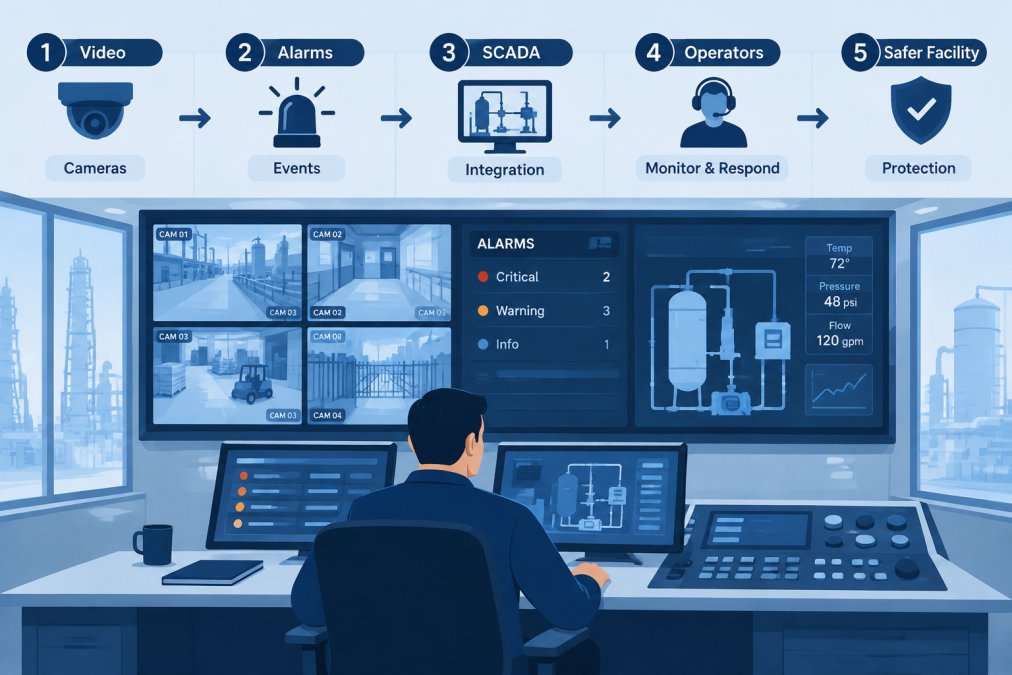
Start with a short list of events that matter to operations. A door forced open in a restricted area should raise an alarm.
Set up alarm routing with these rules:
- Send only actionable alarms to the SCADA alarm list
- Link each alarm to the matching camera view or clip
- Set priority levels that match operator response time
Video works best when an operator can open the feed directly from the HMI.
Watch out for: Alarm floods. If operators receive hundreds of low-value alerts each shift, they will start ignoring the important ones.
Step 4: Apply SCADA Security Best Practices Across Both Systems
Security practices have to work for both the surveillance side and the control side, protecting the whole connected environment.
Authentication, Patching, and Least Privilege
Start with the basics that many OT environments still lack:
- Strong, unique passwords for every device, including cameras and gateways
- Least privilege so each account gets only the access its job requires
- Patch management that tests updates in a lab before they reach live systems
Patching OT systems is slower than patching office computers. Work with the vendor to confirm each update is safe for your process. When a vendor cannot support a patch, isolate that device more tightly.
Use a jump host or secure remote access tool for vendor support. Log every session and end it when the work is done.
Safety and Operational Risk Controls
Security controls must never create a safety hazard. Before you change any system, ask what happens to the process if the change fails.
- Keep manual override paths for critical equipment
- Never let a security device gain authority to stop or start a process
- Keep backups of controller logic and camera configurations
Defense in depth means several layers of protection, so one failure does not expose the whole system. Monitoring and event logging add another layer by showing unusual activity early.
Step 5: Validate, Troubleshoot, and Measure Integration Success
Finish by proving the project works against written criteria, not by watching the screen for a few minutes. Validation confirms that alarms arrive within an agreed time, video loads under load, control systems behave normally, and the integration fails safely when a component drops. Write the acceptance criteria before commissioning.
Acceptance Tests and Targets
Define numeric targets for each integration path and test them during a planned window with operations present. Reasonable starting targets that most practitioners find workable:
- Alarm delivery latency: security event to SCADA alarm list in under 5 seconds on the local network, under 15 seconds across a WAN link
- Video-on-alarm: camera stream visible in the HMI within 3 seconds of alarm selection
- Availability: integration gateway and historian replication at 99.5% or better measured monthly
Run these checks before go-live and record the result for each:
- Trigger every alarm type from the source device and confirm the operator receives it with the correct priority and camera link
- Confirm the camera view opens within the target time while the control network is under normal production load
- Pull the network cable from the gateway and confirm the SCADA system reports the integration as failed rather than silently showing stale data
Troubleshooting in a Fixed Order
Troubleshoot from the source outward: device, then network, then gateway, then historian, then HMI. Changing several things at once masks the real cause.
Common failure patterns are worth naming. A camera that works in its own client but not in the HMI usually has a codec or stream-profile mismatch. An alarm that arrives late but reliably usually points to polling interval or queue depth at the gateway.
Recovery Exercises
Test recovery on a schedule, not once. A quarterly exercise should cover:
- Restoring the gateway configuration from backup onto a spare unit
- Failing over the historian replica and confirming no alarm history is lost
- Replaying a week of security events into a test SCADA instance to confirm the tag mapping still matches after a firmware update
Document the recovery time for each exercise. If a restore takes longer than the operations team is willing to run without security visibility, the backup or spare-parts plan needs work.
Ongoing Integration Health Checks
Measure a small set of numbers every month and review them quarterly with both the security and operations teams:
- Average time from event to operator acknowledgment
- Number of false alarms per shift, by device class
- Percentage of devices with current firmware and valid certificates
Watch out: An integration that passes commissioning can still drift. A camera firmware update that changes an API field, or a new device added without a firewall rule, can break a flow silently. Schedule a quarterly review that re-validates every documented data flow against the live configuration.
The article sets concrete targets for proving the integration works, summarised below.
| Test | Target | Note |
|---|---|---|
| Alarm delivery latency | Under 5 seconds locally | Under 15 seconds across a WAN link |
| Video-on-alarm | Visible within 3 seconds | Measured from alarm selection in the HMI |
| Availability | 99.5% or better | Measured monthly for gateway and historian |
| Write-path integrity | Zero unauthorized PLC writes | Checked during a 72-hour soak test |
| Quarterly recovery exercises | Scheduled, not one-off | Covers gateway restore and historian failover |
Scheduling Your Integration Assessment with Mt. Major Tech
If your site runs several security systems alongside SCADA, a professional assessment can save months of trial and error. Mt. Major Tech provides security integration services for residential and commercial clients across Northern New England.
Start with our services overview to see the integration and support options we offer. When you are ready to plan the work, our process page explains how we move from the initial review through design, deployment, and ongoing care. To book a time or ask a question about your facility, contact our team directly.
Frequently Asked Questions
What is the role of SCADA in security?
SCADA systems monitor and control industrial processes such as power distribution, water treatment, and manufacturing lines. In a security context, SCADA provides the operational view that tells operators whether a process is behaving normally. When physical security systems such as cameras, access control readers, and intrusion sensors feed alarms into the SCADA environment, operators can correlate a door forced open at a pumping station with an abnormal pressure reading. That correlation shortens response time and helps separate genuine incidents from routine events, though it must be designed with strict network isolation so that the added connections do not create new attack paths.
Should physical security systems share a network with SCADA?
In most cases, no. Physical security devices such as IP cameras and badge readers should run on a separate network segment from SCADA control traffic. Shared networks increase the chance that a compromised camera or video recorder can reach controllers or historians. The recommended approach is to place security devices in their own zone, connect the two zones through a firewall or data diode with tightly defined rules, and allow only the specific alarm or status messages that operators need. Any exception should be documented and reviewed.
How do you secure connections between SCADA and access control systems?
Limit the integration to the minimum data required, such as door status, alarm states, and badge events, and pass that data through an intermediate gateway instead of granting direct access to the controllers. Use encrypted links, unique service accounts with least-privilege permissions, and multi-factor authentication for remote administration. Log every cross-zone transaction and review those logs regularly. Confirm that the access control platform can still function locally if the SCADA link fails, so that a network fault does not lock people out of critical areas.
What is the biggest cyber threat to SCADA systems?
Unpatched or unsupported software, weak or shared passwords, and flat networks that let an attacker move from an office workstation into the control environment are among the most frequent weaknesses in industrial settings. Remote access tools left open for vendor support are another common entry point. Addressing these with network segmentation, multi-factor authentication, a documented patch process that accounts for operational downtime, and continuous monitoring for anomalous traffic reduces exposure substantially.